Print2Learn Collective Membership

 
✨ Welcome to your member dashboard

Welcome to Print2Learn™ Collective

Everything inside this membership is designed to help you teach with more clarity, prep with more confidence, and find your resources faster. Start here, take a quick look around, and use this page as your gentle guide into the membership.

Print2Learn Collective logo
Start here first
Welcome
Use this page to get oriented before exploring your monthly resource drops.
Built around
12 Categories
A simple structure that keeps your teaching tools organized, easy to find, and easy to use.
Best next step
Pick a Month
After onboarding, jump into your current monthly drop and start downloading what you need most.
 

Start Here

These three pieces will help new members get settled quickly: a short dashboard tour, a success guide, and the membership roadmap.

Welcome Video

A quick video tour to help you navigate your dashboard with confidence.
  • Shows where to begin
  • Explains how monthly drops are organized
  • Helps members find downloads faster
Open Video Section

Success Guide

Your step-by-step onboarding guide to help you use Print2Learn™ with clarity and confidence.
  • Where to start
  • How to use the categories
  • How to plan your month efficiently
Go to Guide
🗺

Month Made Easy Map™

A visual overview of the Print2Learn™ structure, including all twelve core categories.
  • Shows the full membership layout
  • Makes the resource path feel simple
  • Gives members a fast visual overview
View the Map

Welcome Video

Use this space for your short dashboard tour. Keep it warm, simple, and practical so members know exactly what to click next.
Add your welcome video here Replace this block with your Smart Creator Press video embed, Vimeo embed, Loom embed, or YouTube embed code.
!
Suggested video talking points: Welcome members, show where the monthly drops live, explain the 12 categories, point out onboarding resources, and tell them the best first step to take after watching.

Success Guide

This section gives your members a calm, clear starting path so they do not feel overwhelmed when they enter the dashboard.
1

Watch the Tour

Start with the welcome video so you know how the dashboard is organized.
2

View the Map

Look over the Month Made Easy Map™ to understand the full membership structure.
3

Choose Your Month

Open the current monthly drop and download the resources you need first.
4

Use What Fits

Pick what works for your classroom, homeschool, daycare, or planning style.
Print2Learn Month Made Easy Map visual

Why “Month Made Easy Map™” works better

Month Made Easy Map™ feels more brandable, memorable, and benefit-driven. It tells members that the structure inside the membership is meant to make planning feel easier, not more complicated. P2L Roadmap is still usable, but it sounds a little more internal and less warm. For member-facing language, the stronger choice is Month Made Easy Map™. See Category Peek

Inside the Collective

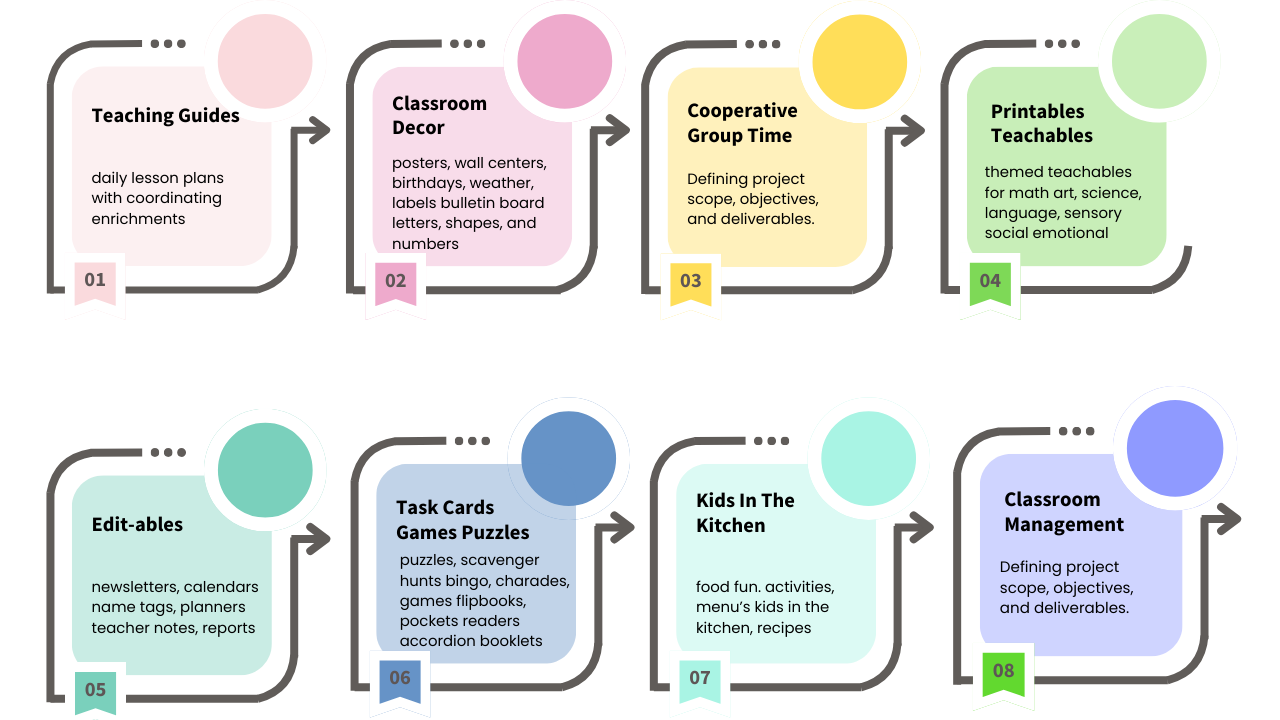
Here is a visual peek at how your membership categories can be introduced to new members before they begin exploring their monthly downloads.
Print2Learn category preview

The 12 Core Categories

This structure can stay the same every month so members always know where to look. Each monthly drop page can list 6–10 downloadable resources under each category.

01. Start HereWelcome resources, onboarding, roadmap, and tutorials.
02. Lesson PlansGuided teaching resources and enrichment tools.
03. Class DecorPosters, bulletin boards, weather displays, and more.
04. Circle GroupDaily discussion tools, concepts, and routine supports.
05. PrintablesMath, art, science, literacy, sensory, and SEL activities.
06. Games & PuzzlesFlipbooks, bingo, scavenger hunts, task cards, and more.
07. Kids in the KitchenNutrition nuggets, recipes, menus, and cooking activities.
08. Class ManagementSchedules, routines, calm helpers, and visual supports.
09. Forms & ChecklistsAssessments, observations, daily notes, and milestones.
10. Editable TemplatesCanva and PowerPoint resources ready to customize.
11. Exclusively DaycareAdmin forms, provider printables, interviews, and conference tools.
12. Member BonusSurprise drops, seasonal packs, and bonus resources.

Next step: build the monthly drop template

Once this welcome page is in place, the smartest next page is your reusable Jan–Dec monthly drop layout. That template can hold all 12 categories with 6–10 download links under each one, ready to duplicate month after month.
 
Print2Learn™ Collective © 2026 Robyn Birge. All rights reserved.

January

🚫 Access Restricted

Oops! You don’t have access to this content yet.

🔹 Already purchased? Log in to access your content.
🔹 New here? Purchase now to unlock instant access.

Goal Progress